

Funnels, journeys, goals and retention
Funnels
A funnel counts how many visitors went through a series of steps, in order: for example, the quickstart, then the API reference, then a sign-up event.
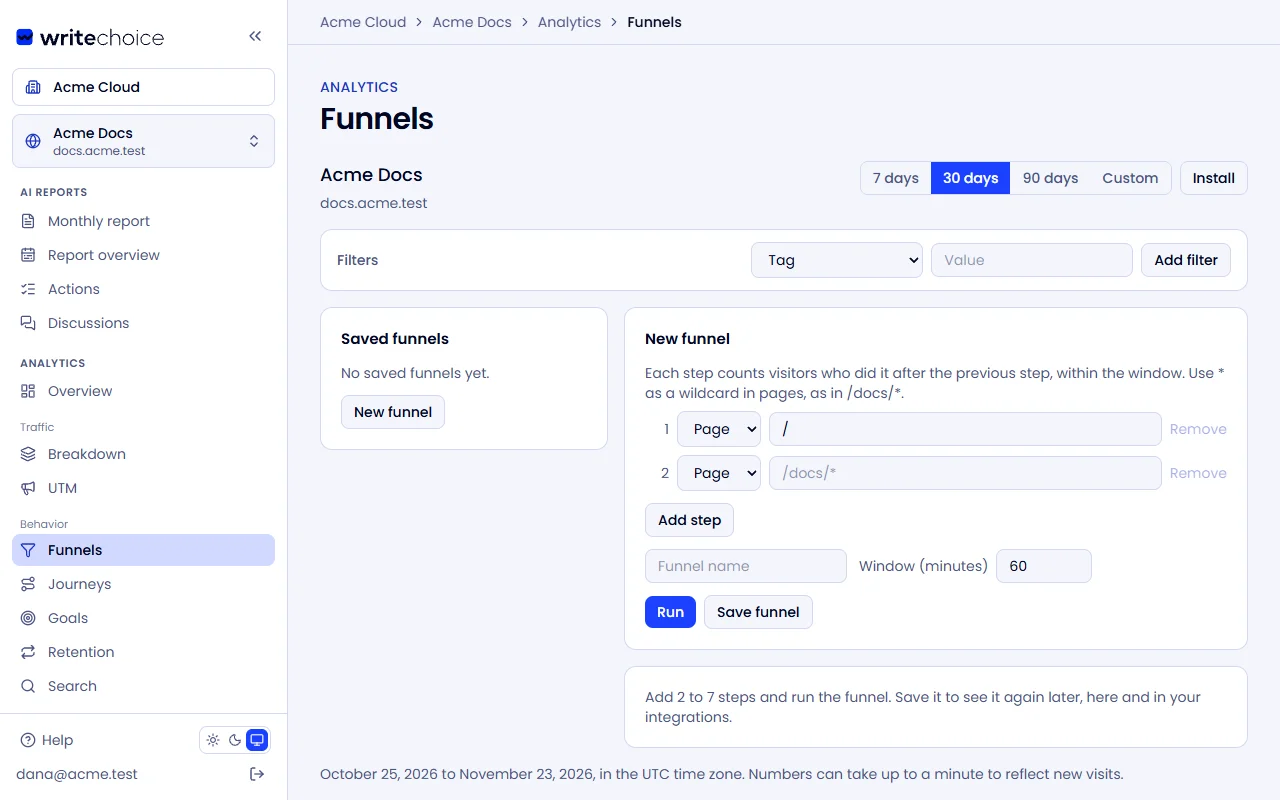
- Choose New funnel.
- Add from 2 to 7 steps. Each step is a Page (such as
/docs/*, with*as a wildcard) or an Event (a custom event name, such assignup). - Set the Window (minutes): how long a visitor can take from one step to the next (60 minutes by default).
- Choose Run.
The result shows how many visitors did each step, the share of the first step that got there, and how many dropped. To keep the funnel, give it a Funnel name and choose Save funnel: saved funnels are listed under Saved funnels, for everyone with access to the site, and can be edited or deleted. A site keeps up to 50 funnels.
Journeys
Journeys lists the most common paths visitors took within a visit. Choose how many steps to show (2 to 7) and, optionally, where the path starts (Start at) or ends (End at): a page (starting with /) or an event name. Repeated steps in a row count once.
Goals
A goal counts the visitors who reached a page or triggered an event. Add one at the bottom of Goals: a Goal name, Visited page or Triggered event, and the page or event (* works as a wildcard in pages). The table shows, for the period, how many completed each goal and the Conversion (the share of all visitors). A site keeps up to 50 goals.
Retention
Retention groups visitors by the day of their first visit in the period, and shows the share who came back on each of the following days.